The use of computers and technology today has become fundamental to the operation of organizations and society (Kroeker, 2010; Yonck, 2010). Today, information is carried at phenomenal speeds within and across various communication networks known as information and communication technology networks (ICT). These allow the transfer of massive amounts of information in a matter of seconds, enabling humankind to advance in a multitude of ways. These include the transfer of rapid real-time communication across great distances; enhancing safety through the tracking of air, marine, and ground traffic; enabling rapid calculations and mathematical estimations to be made to enhance predictive capabilities and to advance science; enhancing the usability and manipulative abilities of models to better forecast and envision results in all the sciences; and, enabling and confirming medical diagnosis from considerable distances, among others. The advancements enabled by the transfer of information via computers and technology are readily observed in the ease with which business is conducted across regional and international borders.
Today, ICT permeates many different industries and is responsible for the growth of production and revenue (Basu and Ferald, 2008). With the increasing global penetration of computers and networks enabled by the Internet (Chinn and Fairlie, 2007), there are many studies indicating the adoption of ICT positively impacts concepts such as creation of significant differences in the world, economic productivity, poverty alleviation, and sustainable development (Madon, 2000; Puri, 2007; Walsham, 2001). Specifically in business, ICT is noted as important for reducing costs in the international and transnational arena (Rangan and Sengul, 2009).
Because of its nature, ICT already has numerous advantages. Besides using it for pleasure and entertainment, we also use it for study and work purposes. (Punie, 2007) ICT encourages learning; it motivates the individual and at the same time gives him (or her) the capability to do certain activities. Besides that, its presence betters the learning environment and enriches the learning experience. (Markovac and Rogulja, 2009) (Punie, 2007) claims that ICT enables the child to process the learning content in an entertaining and interesting way, while (McPake, Stephen, Plowman, Sime and Downey 2005) have proved that the usage of ICT also develops the child’s competences. ICT is not only an educational tool, but also a supporting one, because it helps to develop children with special needs and behavioural problems. (Markovac and Rogulja, 2009) Besides that, it lays the foundation for long life learning and personal development, because among other things it also develops the digital competence and technical competences, which are needed for employment, education, self-development, and general activeness in the modern society. (Punie, 2007) Plowman and Stephen (2003) claim that the usage of ICT is essential for the child, because it can help him (or her) integrate in the “e-society”, meanwhile the child can use its potential, which is still little understood by adults.
For many years ICT have been judged for their potentially bad influence on the child. Often, worries about theusage of ICT are concerned with the question how early exposing of the child to the ICT influences its general development. Experts like Kirkorian, Wartella and Anderson (2009) claim that the children learn more from reallife experiences than from the ones offered by ICT, especially if the content is not suitable for the children. The debate about the technology’s influence on the child’s development has long ago exceeded the borders of academic circle and became public. Plowman, McPake and Stephen (2008) have found out that even the general public thinks that the usage of ICT is dangerous for the child, and that its creative potential is being more and more overlooked. But where hide the reasons for such thinking? The major argument of all studies, which stress the negative sides of ICT is that the children in early stages of development are the most susceptible and because of that also very vulnerable.
In one of their studies Plowman, McPake and Stephen (2010) divided the dangers and disadvantages of ICT usage into three major categories. The first category includes dangers and disadvantaged of ICT usage for the child’s socio-cultural development. The writers found out that ICT supposedly endangers the child’s social development, because children spend less time playing with their peers and are mostly isolated; ICT is supposedly to offer virtual experiences from “the second hand” and not realistic experiences from “the first hand”; besides that the marketing of ICT is in our society very intense and prays on vulnerable children, which represent the biggest part of its target group. The second category includes the dangers and disadvantages of ICT usage for the child’s cognitive development. ICT is supposedly to endanger the child’s intellectual development, the development of imagination (it stimulates passivity and not activity), and the development of language (lack of communication with peers). The last category includes dangers and disadvantages of ICT usage for the child’s wellbeing. Children are supposedly to spent more time in enclosed spaces and not outdoors, the child’s health is also endangered (sitting usage, which increases the risk of obesity), the usage of ICT supposedly leads to addiction with technology and exposure to inappropriate content., besides all that the chances of child interacting with family members are also decreased, what is supposedly to lead towards decreasing of child’s emotional development.
All these dangers and disadvantages of ICT usage are mostly connected with the amount of ICT usage, its content and the degree of parent control. Today, children can through ICT more easily access various contents than ever before. Adults do not have control over this access, because the media environment has changed so drastically that a complete control over the child’s usage of ICT is today practically impossible. (Roberts, Foehr, Rideout, and Brodie, 1999).
How to Use Google Mail (Gmail)
Email is one of the way to communicate with other in long distance. May kind of email that can use by all people all-around the world such as : Yahoo, Gmail etc . Now, I would like to tell about How to Use Google Mail or Gmail in easy explaination
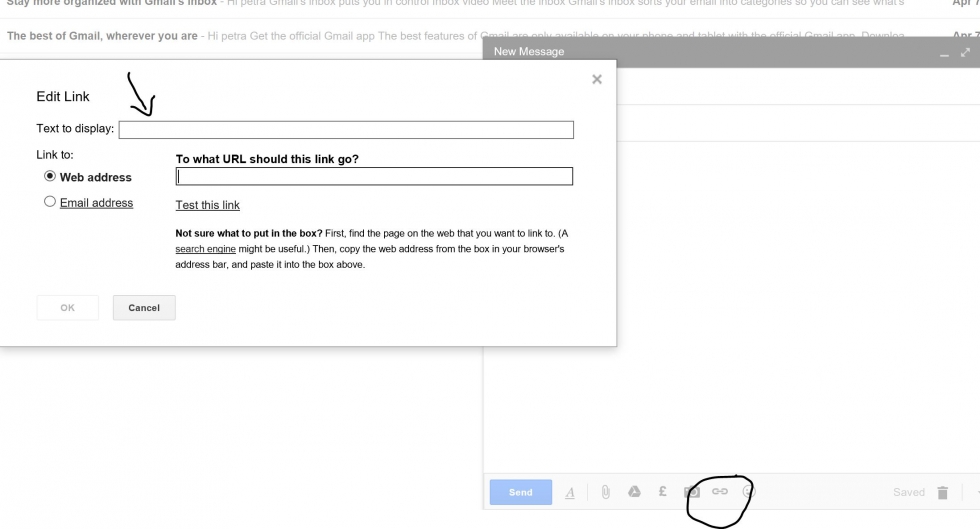
1. Write “ Gmail “ in your search engine and push “Enter” in keyboard to make it work. Esspecially I use Google for my search engine

2. Choose “Gmail-Google” to sign up or log in your account

3. Write your Gmail to sig up and log in your account

4. Write your password to sign up or log in your account

5. To see your email inbox you can choose “Inbox or Kotak Masuk” and click

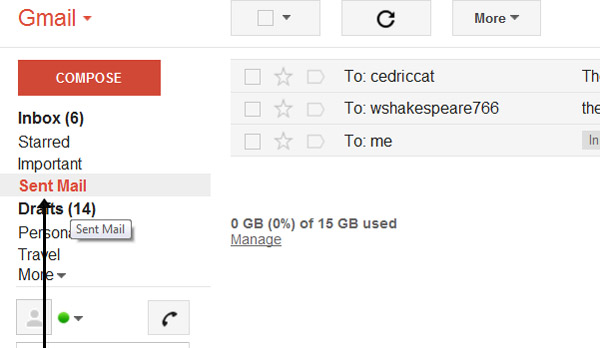
6. To check your sent email you can click on “Sent Email or Email Terkirim”

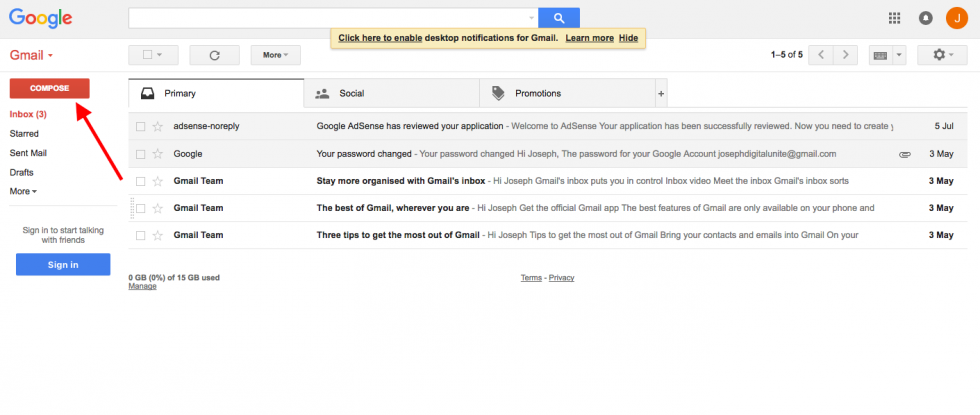
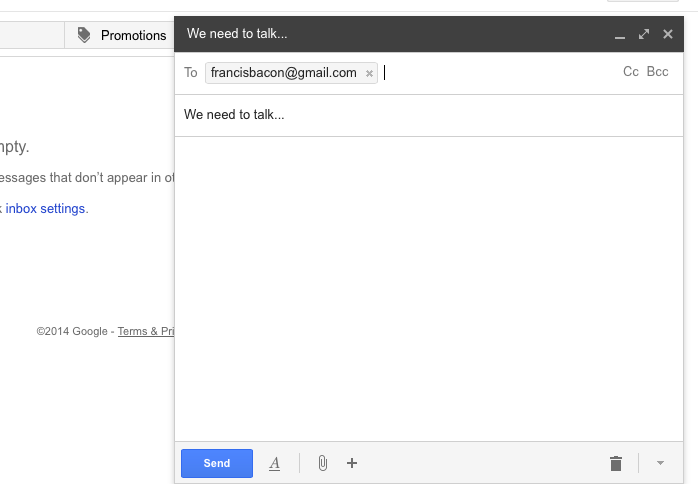
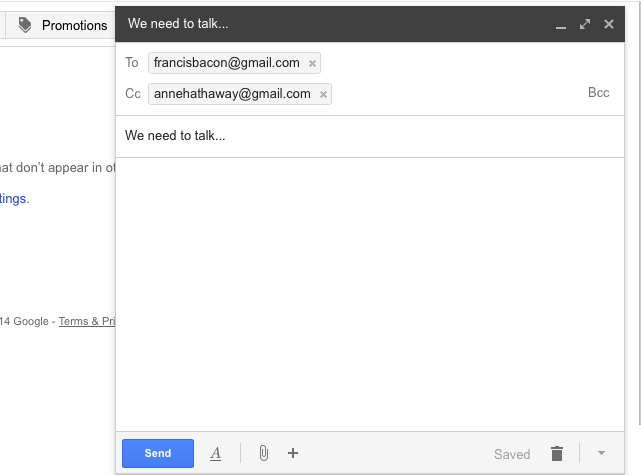
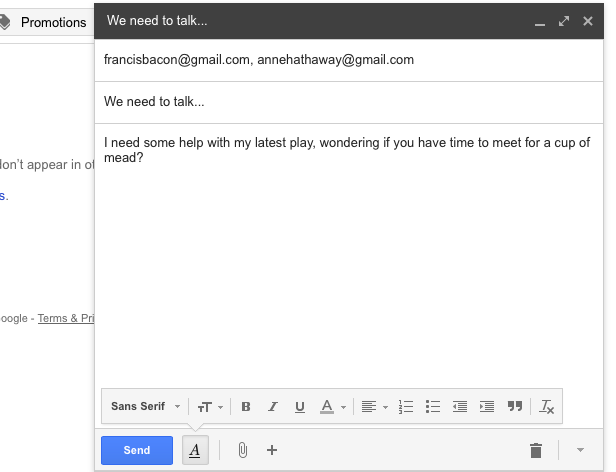
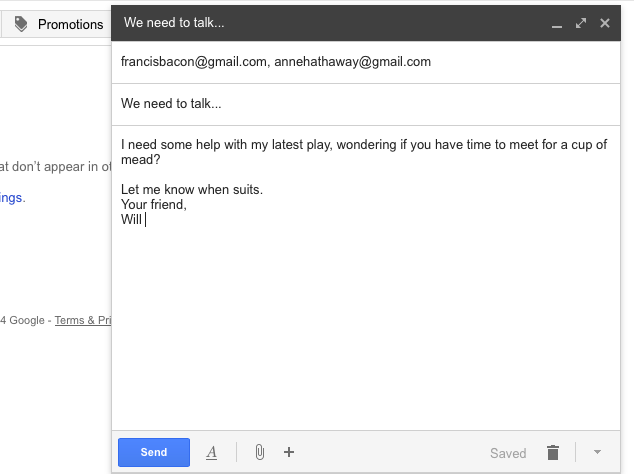
7. To write an email you can click on “ Compose or Tulis” and you will find place to write your email in right down corner

References
• Kroeker, K.L, (2010). Engineering the web`s third decade. Association for Computing Machinery, 53(3), 16-18
• Yonc, R. (2010). The age of the interface. The Futurist, 44(3), 14-19.
• Basu, S. and Fernald, J. (2008). Information and communications technology as a general purpose technology: Evidence from U.S. industry data. Economic Review – Federal Reserve Bank of San Francisco, 1-15.
• Chin, M.D. and Fairlie, R.W. (2007). The determinants of the global digital divide: A crosscountry analysis of computer and internet penetration. Oxford Economic Papers, 59(1), 16-44
• Madon, S. (2000). The internet and socioeconomic development: Exploring the interaction.
Information Technology and People, 13(2), 85-101
• Puri, S. (2007). Integrating scientific with indigenous knowledge: Constructing knowledge
alliances for land management in India. MIS Quarterly, 31(2), 355-379.
• Walsham, G. (2001). Making a World of Difference: IT in a Global Context. Wiley & Sons,
USA.
• Rangan, S. and Sengul, M. (2009). Information technology and transnational integration:
Theory and evidence on the evolution of the modern multinational enterprise. Journal
of International Business Studies, 40(9), 1496-1514.
• Punie, Y. (23. 5. 2007). Learning spaces: an ICT-enabled model of future learning in the knowledge-based society. European Journal of Education, 42. Retrieved 30. 10. 2010, from http://onlinelibrary.wiley.com/doi/10.1111/j.1465-3435.2007.00302.x/full
• Markovac, V. and Rogulja, N. (2009). Key ICT competences of kindergarten teachers. In 8th special focus symposium on ICESKS: Information, Communication and Economic Sciences in the knowledge society (p. 72-77). Zadar: Faculty of Education , University of Zagreb in ENCSI database
• McPake, J., Stephen, C., Plowman, L., Sime, D., and Downey, S. (2005). Already at a disadvantage? ICT in the home and children's preparation for primary school. Retrieved 30. 10. 2010, from the website University of Stirling: http://www.ioe.stir.ac.uk/research/projects/interplay/docs/already_at_a_disadvantage.pdf
• Plowman, L. and Stephen, C. (2003) A »benign addition«? Research on ICT and pre.school children. Retrieved 21. 11. 2010, from the website University of Stirling: https://dspace.stir.ac.uk/bitstream/1893/459/1/Plowman%20JCAL.pdf.
• Plowman, L., McPake, J., and Stephen, C. (2010) The technologisation of childhood? Young children and tecnology in the home. Children and Society, 24. Retrieved 30. 10. 2010, from http://onlinelibrary.wiley.com/doi/10.1111/j.1099-0860.2008.00180.x/full.
• Roberts, D. F., Foehr, U. G., Rideout, V. J., and Brodie, M. (1999) Kids and Media @ the New Millenium. Retrieved 6. 1 . 2011, from http://www.kff.org/entmedia/upload/Kids-Media-The-New-MillenniumReport.pdf